Screens
Contractor profiles
Who is a contractor, and on what terms. A profile is what makes somebody a contractor: their legal entity, how they are paid, their invoice series, their contract and who accepts their months. Their pay rate is not here; it is their cost on Team costs.
Who sees it
Finance and administrators, on plans that include contractors (Team, Enterprise and the trial). Choose Contractors in the menu, under Payables, then Profiles at the top. It is at /contractors/profiles; the old address, /admin/contractors, still opens it.
What each can do differs, because naming an engagement manager gives that person the right to approve the contractor's time:
- Administrators make someone a contractor, choose and change their engagement manager, and do everything else here.
- Finance edits the rest of a profile, confirms payment details and removes profiles. New contractor is disabled for them (Only an administrator can make somebody a contractor.), and in a profile the engagement manager is shown but cannot be changed.
Managers named as engagement managers reach the register on Contractors, but not this screen. A contractor keeps their own legal entity, payment details and numbering on My Month → Billing details.
The list
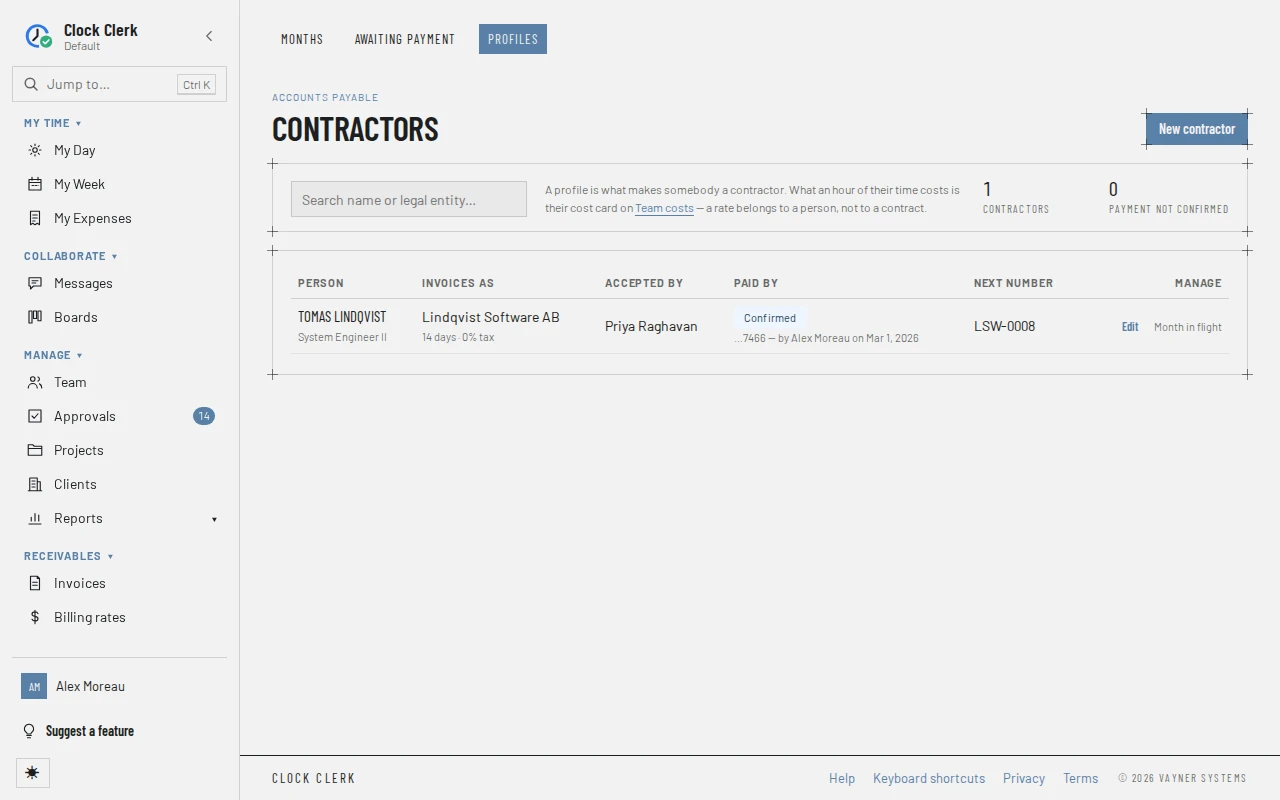
- Search name or legal entity… narrows the list. Beside it, how many Contractors there are, and how many have Payment not confirmed.
- Person: the contractor and their job title.
- Invoices as: their legal name, or No legal name yet, with their payment terms and tax.
- Accepted by: their engagement manager.
- Paid by: Confirmed, Not confirmed or Nothing to confirm, with the end of the account number (or what the other payment option is) and who confirmed it when. nothing can be approved for payment means the details have changed since anyone confirmed them; no payment details on file means there are none yet.
- Next number: the next number in their own invoice series.
- Manage: the buttons below.
A profile
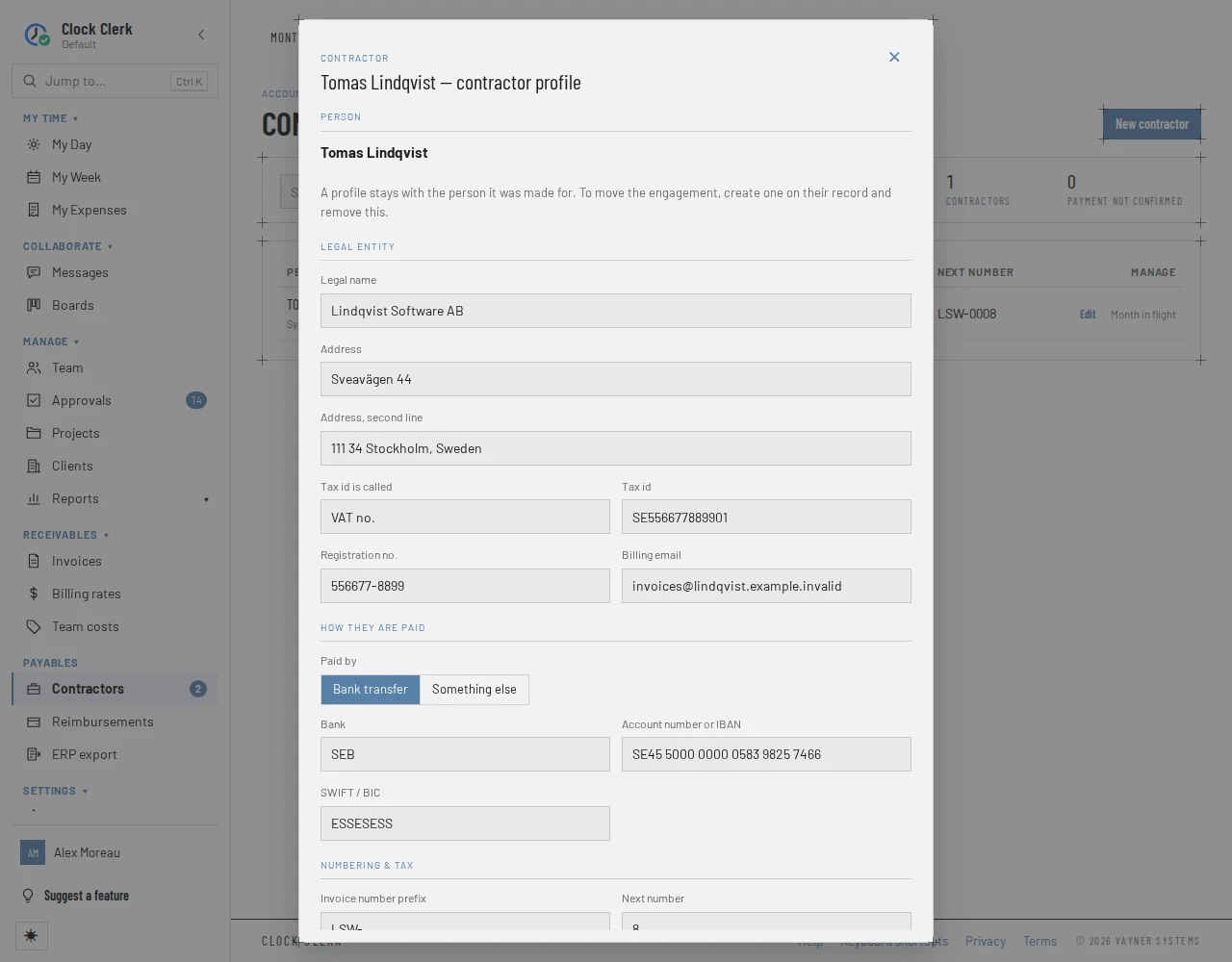
New contractor and Edit open the same form:
- Person: Who is the contractor, chosen once. A profile stays with the person it was made for; to move an engagement to someone else, create a profile for them and remove this one.
- Legal entity: who the protocol and the invoice are from. Legal name, Address and Address, second line, Tax id is called (such as VAT no.) and Tax id, Registration no. and Billing email.
- How they are paid: Paid by Bank transfer, with Bank, Account number or IBAN and SWIFT / BIC; or Something else, with What it is (such as a wallet and its network) and Where to send it, both needed before a month can be submitted. On a profile whose details are confirmed, changing where the money goes says Saving these details will clear the confirmation. Nothing can be approved for payment until an administrator confirms them again. before you save.
- Numbering & tax: their own Invoice number prefix and Next number, Tax % and a Tax note printed on the invoice, such as a reverse-charge line.
- Contract: Contract no., Under contract since, Payment terms (days), which set each month's due date, What is supplied, and the Engagement manager who accepts their months. Only Managers, administrators and Finance users allowed to countersign are offered, never the contractor themselves, and a Manager must manage a project the contractor books to.
Choose Add contractor or Save profile. Adding a profile gives the person My Month and turns off their Paid holidays (see People).
Its buttons
| Button | What it does | When it appears |
|---|---|---|
| New contractor | Makes someone a contractor. | Always; enabled for administrators while your organization is not read-only. |
| Confirm payment details | Shows where the money goes, in full, and asks you to check it against what the contractor told you. Confirm payment details again records who confirmed it and when. | On a contractor whose details are Not confirmed, while your organization is not read-only. |
| Edit | Opens the profile. | On every contractor. |
| Remove | Asks Remove this contractor profile?; Remove profile stops the person being a contractor. Their finished months stay on the record, and their timesheets, cost card and account are untouched. | Unless a month of theirs is submitted and not yet paid, when Month in flight shows instead. Disabled while your organization is read-only. |
How these fit into the month is in Pay contractors.