Screens
Contractors
The reviewer's side of contractor billing: every contractor's month, a month at a time, and the document each decision is made on. Engagement managers countersign here, and Finance approves and pays. A contractor's own side is My Month.
Who sees it
On plans that include contractors (Team, Enterprise and the trial), Contractors is in the menu under Payables, at /contractors, for:
- Finance and administrators, who see every contractor.
- A Manager named as a contractor's engagement manager, who sees only the contractors whose profiles name them, and only while they still have a grant over those contractors' projects.
Being a contractor does not give you this screen; your own month is on My Month. Users and other Managers do not have it.
The number beside Contractors in the menu is what is waiting on you, across every month: for an engagement manager, the months Awaiting sign-off on their contractors; for Finance and administrators, the months With accounting and Approved to pay.
Finance and administrators also see three sections at the top: Months (the register), Awaiting payment and Profiles, which is Contractor profiles. A Manager sees the register alone.
The register
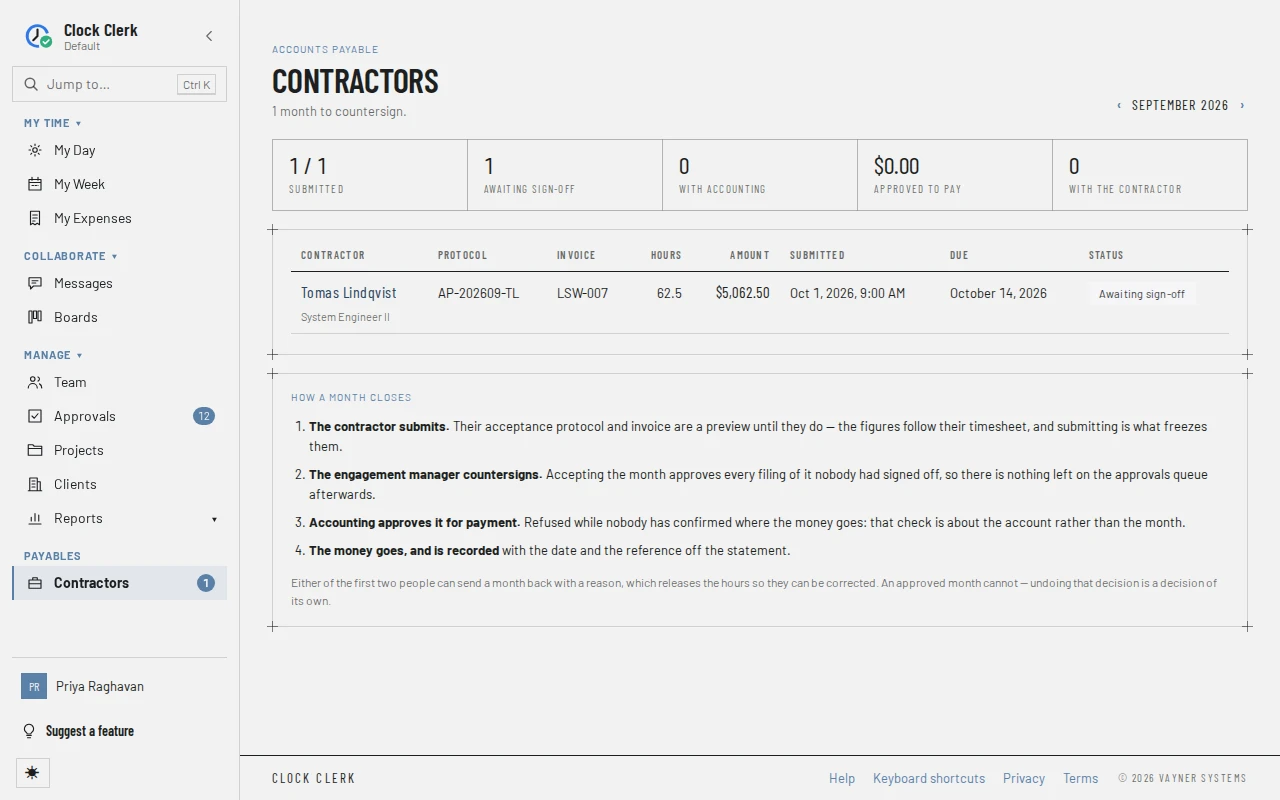
- The heading says what is waiting on you this month: … months to countersign. for an engagement manager, … months to approve. for Finance and administrators. For Finance and administrators, Awaiting payment beside it counts every claim not yet paid and what they come to.
- ‹ and › step between months. It opens on the current month and goes no further forward.
- The tiles count the month: Submitted out of all the contractors, Awaiting sign-off, With accounting, what is Approved to pay, as an amount, and With the contractor (not started, in draft or returned). For Finance and administrators the Approved to pay tile holds the payment run: Export … to payment file, or Payment file up to date once there is nothing left to put in one.
- A row per contractor, including those who have not started the month: the name, with their job title or engagement manager; the Protocol number; the Invoice number (their own if they issue their own); Hours; Amount; when it was Submitted; when it is Due; and its Status. Under the status, in the payment file or sent to … (your ERP) says how it is being paid, and payment details unconfirmed says it cannot be approved for payment yet. The name opens the month.
- Engagement managers get the months Awaiting sign-off first; Finance and administrators get those With accounting first.
- How a month closes sums up the four steps, and who can send a month back.
Until a month is submitted, its figures are a preview that follows the contractor's timesheet. The steps are in Pay contractors.
A contractor's month
Choosing a contractor opens their month at /contractors/<person>/<month>, with ‹ Contractors back to the register.
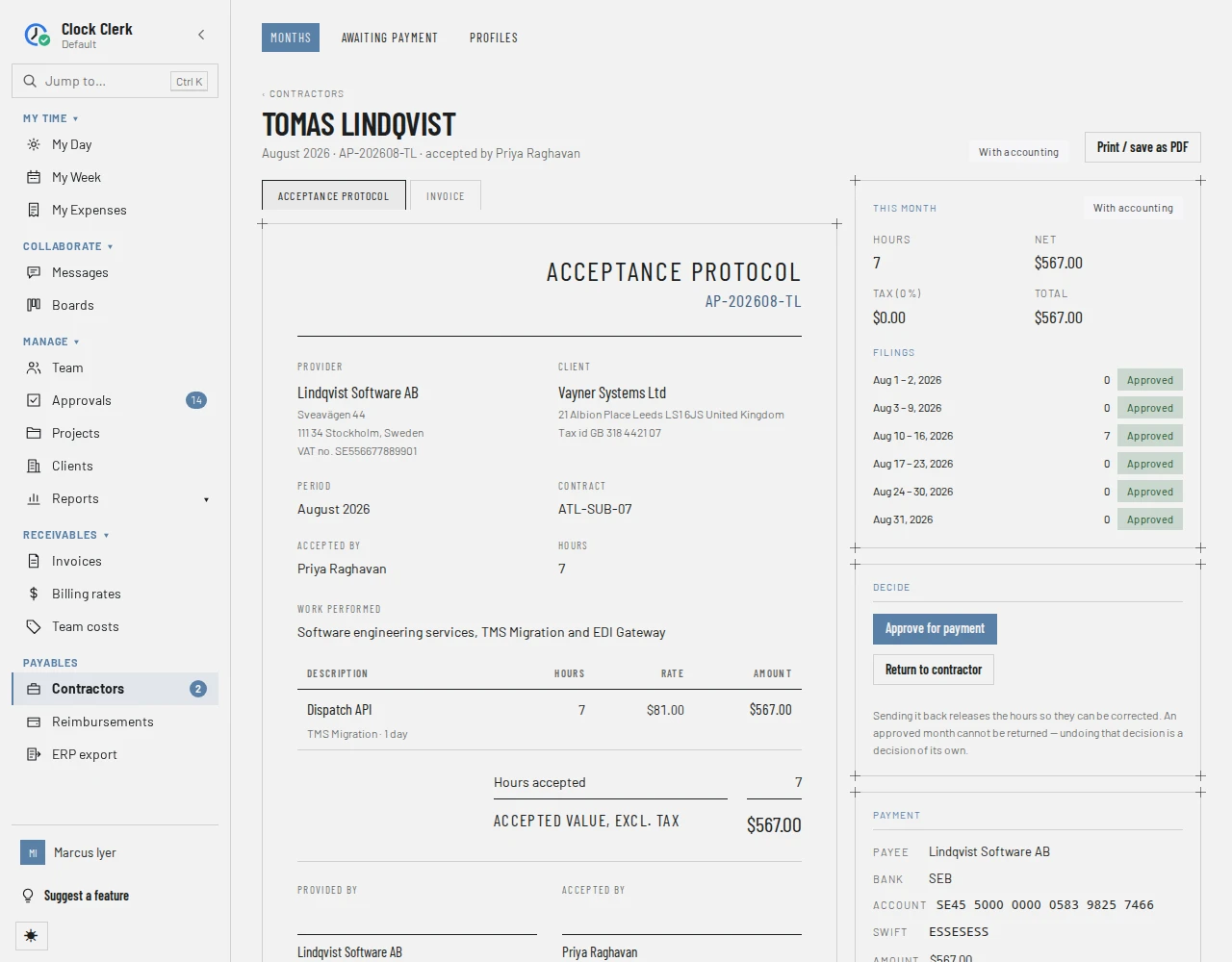
- The heading: the contractor, the month, the protocol number and who accepts it, the month's state, and Print / save as PDF, which prints both documents.
- Before the contractor submits, a note says Nothing has been submitted for this month. The figures below follow …'s timesheet and are theirs to change until they do. A month sent back shows Sent back — and the reason.
- Acceptance protocol and Invoice: the two documents, exactly as the contractor sees them on My Month. The Rate on the protocol is what the contractor is paid.
- This month: hours, net, tax and total, and Filings, the weeks (or parts of weeks) in the month with their hours and whether each is approved.
- Decide: the buttons below, or a sentence saying who the month is waiting on.
- Payment: the payee and where the money goes, in full (the account, or what the other payment option is and where to send it), the amount and the due date, and the reference once it is paid, with Copy. Under it, Payment details confirmed on …, or a warning that nobody has confirmed them.
- Checks: the same checks the contractor sees before submitting, each saying whether it blocks submission, blocks payment or is a warning.
- History: everything done to the month and every email about it, newest first.
Its buttons
None of the decisions appear while your organization is read-only. On your own month, if you are also paid as a contractor, there is no Countersign protocol or Return to contractor: nobody accepts or sends back their own.
| Button | What it does | When it appears |
|---|---|---|
| Countersign protocol | Accepts the month's work, and approves every week of it nobody had approved. The month goes to With accounting. | Awaiting sign-off, for the engagement manager, administrators, and Finance users allowed to countersign. |
| Approve for payment | Clears the month for payment. Refused while the payment details are unconfirmed. | With accounting, for Finance and administrators. |
| Mark as paid | Records the day the money left and the bank's reference. The month says Paid. | Approved to pay, for Finance and administrators. |
| Return to contractor | Sends the month back with a required reason, releasing its hours. A countersigned month loses its countersignature. | Awaiting sign-off or With accounting, for anyone who can open the month. |
| Send reminder, or Mark as reminded | Nudges whoever the month is waiting on, and writes it on the history. Mark as reminded means there is no way to email them, so only the history records it. | While the month is waiting on the contractor (not started, draft or returned) or on the engagement manager (awaiting sign-off), unless that is you. |
| Confirm payment details | Opens Contractor profiles, where the details are confirmed. | Under Payment, for Finance and administrators, while the details are unconfirmed. |
| Print / save as PDF | Prints the protocol and the invoice through your browser, or saves them as a PDF. Leave Margins on Default under More settings in the print dialog, so the printout keeps its own margins. | Always. |
A Finance user who is not allowed to countersign sees Return to contractor on a month awaiting sign-off but not Countersign protocol.
Awaiting payment
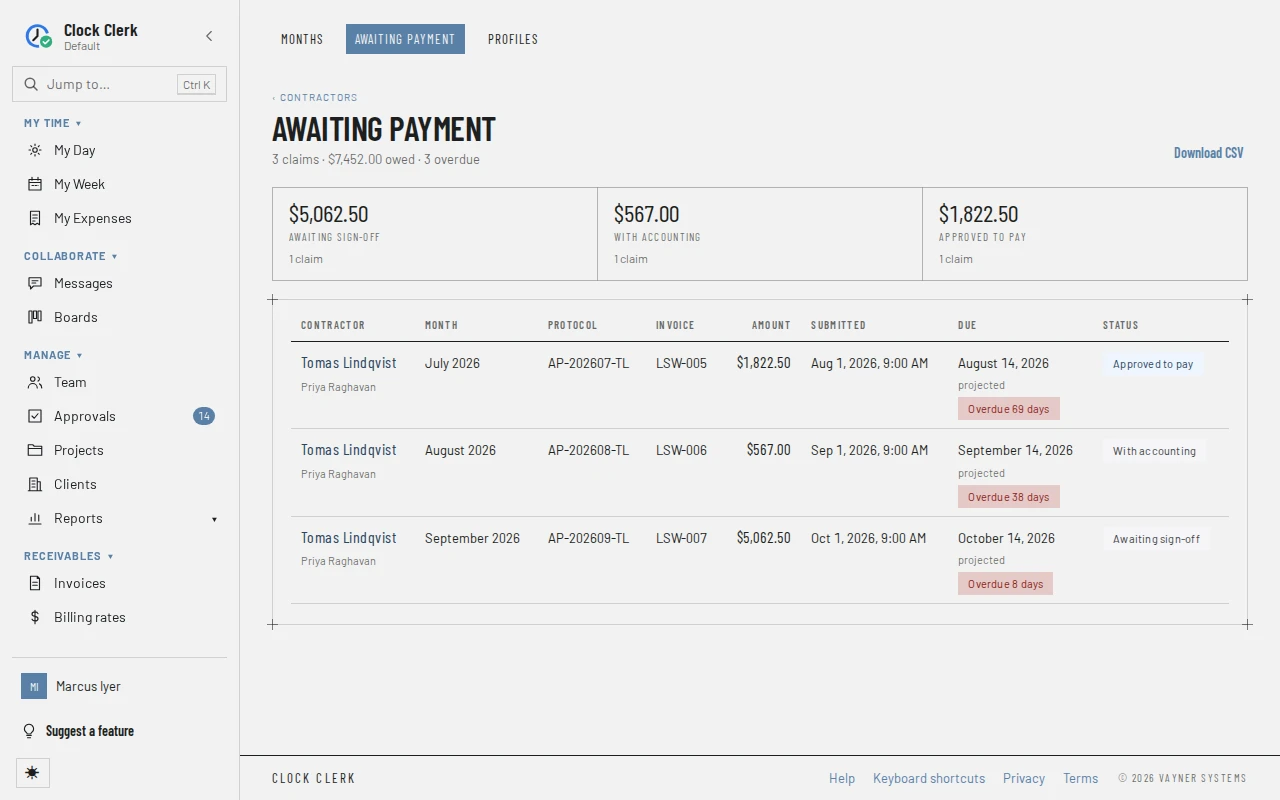
For Finance and administrators, at /contractors/outstanding, from Awaiting payment at the top or beside the register's heading. It lists every month that is Awaiting sign-off, With accounting or Approved to pay, oldest due first, with a total for each state. A month returned to the contractor or not yet submitted is not owed, so it is not here.
- Each row has the contractor and their engagement manager, the month, the protocol and invoice numbers, the amount, when it was submitted and its Status.
- Due is projected until the month is in a payment file (in the payment file) or on a vendor bill (on the vendor bill), because the payment terms can still change before then. A claim past its date says Overdue … days.
- Download CSV saves the list.
Nothing is decided here: choose a contractor to open the month and act on it.