Screens
Feedback
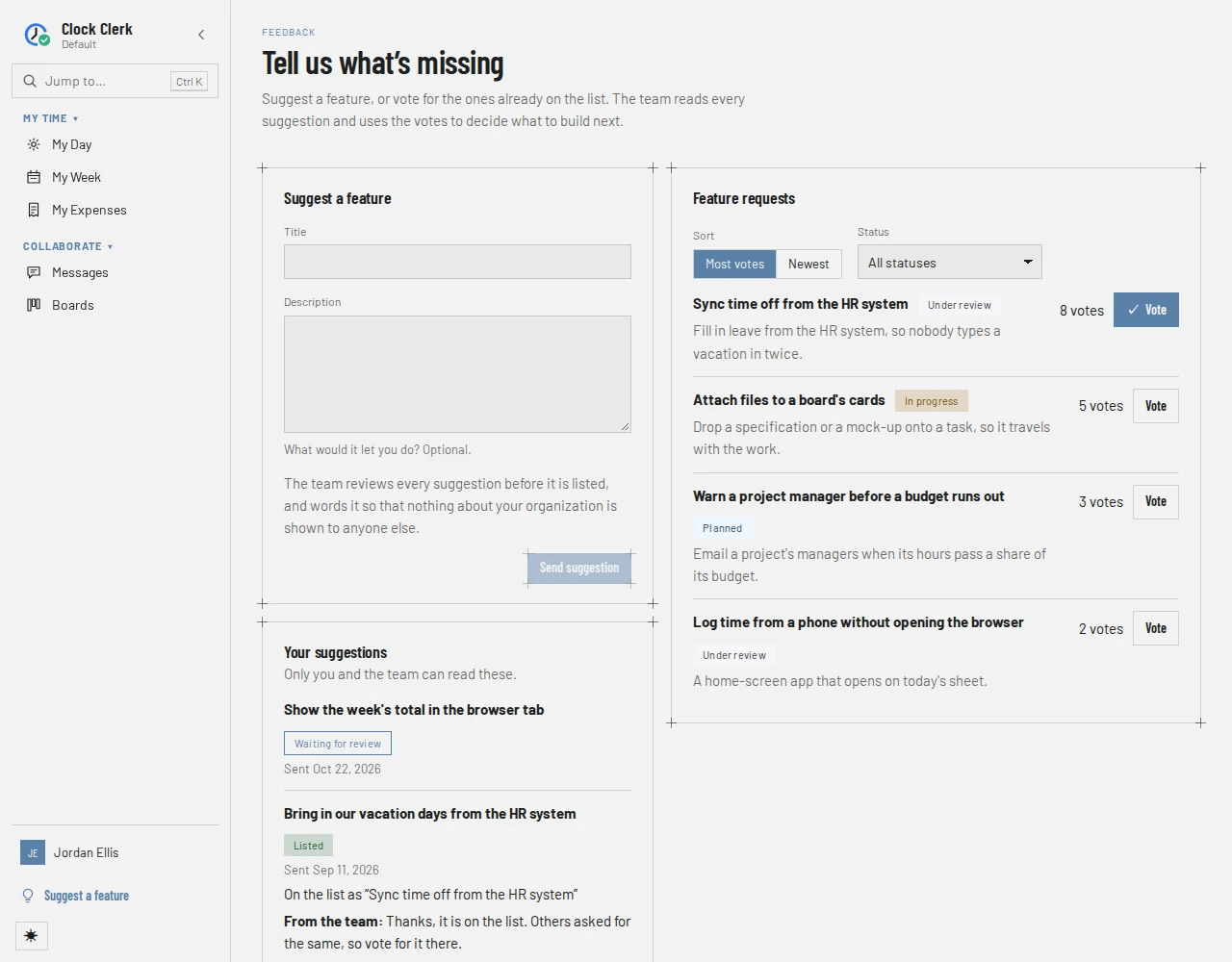
Where you tell the Clock Clerk team what is missing, and vote for what other people asked for: a form to suggest a feature, the shared list of feature requests, and your own suggestions with the team's answers. Open to every role. Step by step, it is in Your account and your data.
Who sees it
Everyone who signs in to an organization, whatever their role: Feedback, above your name at the foot of the menu, opens it at /feedback. Administrators also reach it from Missing something? Tell us on the trial's strip, and from the line under the heading of Plans and your trial.
It stays fully open while your organization is read-only, after a trial ended or a subscription lapsed: you can still suggest and vote. Client guests do not have it.
Suggest a feature
- Title: up to 120 characters. Send suggestion waits until there is one.
- Description: optional, up to 2,000 characters. What would it let you do? Ctrl + Enter (⌘ + Enter on a Mac) sends the suggestion too; Enter starts a new line.
As the form says, The team reviews every suggestion before it is listed, and words it so that nothing about your organization is shown to anyone else. Once sent, the form empties and says Thanks. Your suggestion is waiting for review, and the team’s answer will appear under Your suggestions.
On the live demo the form is replaced by Suggestions are turned off in the live demo. You can still vote on the list.
Feature requests
The list every organization using Clock Clerk votes on, written by the Clock Clerk team. Each request has its title, its status, what it is about, its count of votes and Vote.
- Sort: Most votes, the default, or Newest.
- Status: All statuses, Under review, Planned, In progress or Shipped. Declined requests are not listed.
- Vote is marked with a tick while your vote stands. The count is everybody's votes, from every organization; who voted is never shown, to anyone.
With nothing on it yet, the list says Nothing is on the list yet. Be the first to suggest something.
Your suggestions
Only you and the team can read these. Your administrator cannot see them either. Each shows its title, when you sent it, and where it stands:
| Tag | Meaning |
|---|---|
| Waiting for review | The team has not decided yet. |
| Listed | It is on the list in the team's words, On the list as “…”, with your vote counted. |
| Merged | Somebody had asked for it already: Merged into “…”, with your vote counted there. |
| Declined | It will not be listed; the team says why. |
What the team wrote back follows From the team:.
Buttons and when they appear
| Button | What it does | When you have it |
|---|---|---|
| Send suggestion | Sends your suggestion to the team. Ten an hour per person; after that, You’ve sent a lot of suggestions in the last hour. Please try again later., and what you typed is kept. | Everyone, once there is a title; not on the live demo. |
| Most votes, Newest, Status | Order and narrow the list. | Always. |
| Vote | Casts your vote, or takes it back. | On every listed request, for everyone, the live demo included. |