Screens
Plans and your trial
How a free trial runs, what it includes, what happens when it ends, and the Plans page where an administrator chooses a plan or asks for more time. Turning the trial into a subscription is the last step of Set up your organization.
Who sees it
The Plans page (/trial) is for administrators only. They reach it from the notice at the top of the app, by See plans during the trial or Choose a plan once it has ended. On the Organization tab, Compare plans beside a Free plan's usage, and Choose a plan where the billing card offers it, lead there too; on the Free plan they are the only way in. Nobody else has a link to it, and opening its address says You don't have access to this area.
Everybody sees the read-only notice once a trial has ended, because it explains why the buttons have stopped working.
The trial
- When it starts: when the organization is created, either at the emailed sign-up link or when a Microsoft administrator grants consent (see Signing up and setting up). It runs for the number of days the sign-up page names, set by whoever runs Clock Clerk, and ends at the end of its last day, in UTC.
- What it includes: everything on the Team plan, with no limit on people, projects or clients and no card. The one thing held back is threads shared with your clients, and inviting client guests into them, which arrives with any paid plan.
- Seats: free for the whole trial. You size the plan at the end.
- Free instead: an organization started with Start on Free has no trial. It is on the Free plan from the start and never goes read-only.
The notice and the emails
During the trial, administrators see a strip at the top of every page: Free trial, … days left — it ends on …, and on the last day Today is the last day. Clock Clerk goes read-only tomorrow unless a plan is chosen. It ends with See plans and Missing something? Tell us, which opens Feedback. Other people see nothing until the trial has ended.
Administrators are also emailed seven days, three days and one day before the trial ends, and on the day itself. Each administrator can turn these off on their profile with Email me when the organization's free trial is ending.
The Plans page
- The heading: how many days are left, Today is the last day of your trial, or Your trial has ended, with the end date above it and what happens next below.
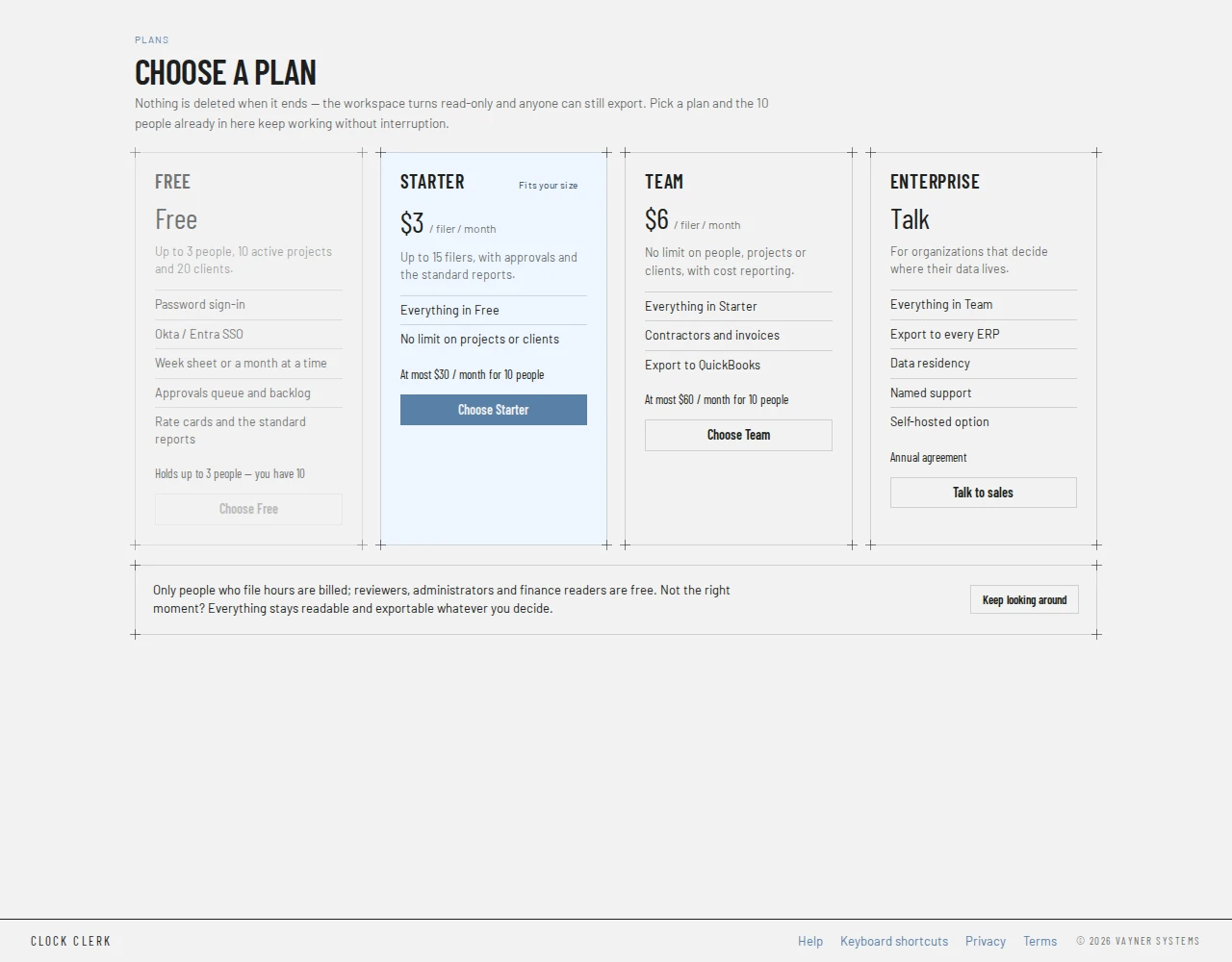
- A card per plan: Free, Starter, Team and Enterprise, each with its price per filer per month, what it holds and what it adds. A filer is someone who enters hours; reviewers, administrators and finance readers are free. Under each price, At most … / month for … people counts everyone who has not left, so it is a ceiling.
- Recommended marks Team, which the page recommends whatever your size: it is the plan with contractors, invoices and cost reporting.
- Fits your size marks the cheapest plan that holds your organization, which may leave out features you need. A plan you have outgrown is grayed, says which limit, for example Holds up to 3 people — you have 8, and cannot be chosen. The page measures this by head count, everyone who has not left, not by filers: an organization of 16 people or more cannot choose Starter here, even if fewer than 15 of them enter hours.
- On a trial, Suggest a feature or vote on the list, for anything you miss before you decide.
Choosing a plan
What a Choose button does depends on whether your deployment takes payment online:
- Where it does, Choose Starter and Choose Team open Pay for … on the page, with Stripe's payment form. It lists the card your organization already has on file, saved with Update card or by an earlier subscription, above the ways to pay with something new. Subscribe takes the one you pick; nothing is charged that day, because you are billed monthly afterwards for the people who entered time. The page then says Confirming your payment… until Stripe confirms, which usually takes a few seconds, and the plan applies. Close backs out and changes nothing.
- Choose Free, during a trial or once it has ended, opens Choose Free, which says what Free leaves out. Move to Free puts the organization on Free straight away, with no card and no end date, and an organization that had gone read-only opens again. Nothing already entered is deleted. It is refused while the organization has more than Free holds; see the message. It is refused too while the organization signs in through Okta, Google Workspace, Microsoft or another identity provider, because Free signs in with passwords only: switch back to passwords first, or pick a paid plan, which keeps your sign-in (see the message).
- Where it does not take payment online, and for Free once a paid subscription has ended, the button opens Choose … with a box for Anything they should know (optional). Send to support emails Clock Clerk's support, and the page says Sent. Support will be in touch about the … plan — replies go to your email address. Nothing changes until support puts the organization on the plan. Free does not lift the lock of a subscription that has ended.
- Talk to sales, on Enterprise, is always the message to support.
Once your organization has a subscription, the Starter and Team cards say Manage billing instead, or Pay now while a payment is owed, and take you to the Plan & billing card on the Organization tab, where the plan is changed or canceled.
More time
An administrator can extend the trial once, from the Plans page, in its last seven days or after it has ended. Ask for 10 more days (or however many days your deployment gives) moves the end date that many days past the later of today and the old end date, and an organization that had gone read-only opens again straight away. The heading then says Trial extended to …. The button is not offered a second time.
When the trial ends
Nothing is deleted. The organization becomes read-only for everybody until a plan is chosen, and every page shows Your free trial has ended with Clock Clerk is read-only until a plan is chosen. Everything recorded up to … is still here and can still be read, reported on and exported. Administrators get Choose a plan beside it.
- Still works: signing in, reading every screen, reports and their exports, opening a saved report, your own preferences on the profile, marking messages read, and suggesting or voting on features. For administrators: choosing a plan, paying, and the one extension.
- Stops: everything that adds or changes something, such as hours, submitting, approvals, invoices, people, the catalog, and the export to an ERP. The week, the day, Approvals, the New buttons and the edit dialogs turn their buttons off. Anything else is refused when pressed, and the first refusal says Clock Clerk is read-only for your organization until a plan is chosen.
- Email: the scheduled reminders and digest stop. The last trial-ending email to administrators arrives on the final day, before the lock, and none follows it.
A paid subscription that ends unpaid locks the organization the same way, under Your subscription has ended; see When the organization is read-only.
Removal after 90 days
An organization nobody pays for is not kept for ever. If no plan is chosen, it is removed with everything in it 90 days after the trial's last day, or 90 days after a subscription ended or Stripe gave up collecting it. Until then nothing is deleted.
- The strip says when: If nothing changes, the organization and everything in it are removed for good on …
- Every administrator is emailed 30 days and 7 days before the day. These emails cannot be turned off.
- Choosing a plan, or paying through Manage billing, stops it. So does choosing Free after a trial (not after a subscription has ended), or an extension of the trial while it lasts.
- Download your data on the Organization tab first if you want to keep it; it works while the organization is read-only.
- Nothing is removed less than 30 days after its date was first set, so the 30-day email always comes first.
- After removal, its data leaves Clock Clerk's backups within 30 days.
What each plan includes
| Feature | Free | Starter | Team | Enterprise | Trial |
|---|---|---|---|---|---|
| Limits | 3 people, 10 open projects, 20 active clients | 15 people entering hours in a month or billing period | None | None | None |
| The week sheet, approvals, billing rates and the standard reports | Yes | Yes | Yes | Yes | Yes |
| Password sign-in, with two-step sign-in and passkeys | Yes | Yes | Yes | Yes | Yes |
| Single sign-on with Okta, Google Workspace, Microsoft 365 or any OpenID Connect provider | No | Yes | Yes | Yes | Yes |
| Holiday schedule | No | Yes | Yes | Yes | Yes |
| Threads shared with clients, and client guests | No | Yes | Yes | Yes | No |
| Cost card and cost reporting | No | No | Yes | Yes | Yes |
| Invoices | No | No | Yes | Yes | Yes |
| Contractors | No | No | Yes | Yes | Yes |
| Scheduled reminders and the weekly digest | No | No | Yes | Yes | Yes |
| Your logo and brand color | No | No | Yes | Yes | Yes |
| Task imports from other tools | No | No | Yes | Yes | Yes |
| Export to QuickBooks | No | No | Yes | Yes | Yes |
| Export to every other ERP | No | No | No | Yes | No |
| Provisioning people from Okta or Entra ID (SCIM) | No | No | No | Yes | No |
On Free, the next person, project or client past a limit is refused, for example The Free plan is for up to 3 people, and your organization has 3. Move to the Team plan to add anybody else, or set an end date on somebody who has left. Marking a project Complete or archiving a client makes room. On Starter, the sixteenth person to enter hours in a month is refused. Nothing already there is taken away. Screens a plan leaves out are not in the menu; what was entered before moving down stays stored and comes back with a plan that has it. Single sign-on is the exception to moving down: an organization that signs in through a provider switches back to passwords before it can move to Free, and keeps its sign-in on any paid plan.
Buttons and when they appear
| Button | What it does | When you have it |
|---|---|---|
| See plans, Choose a plan | Opens the Plans page. | Administrators, in the notice at the top: See plans during the trial, Choose a plan once the organization is read-only. |
| Missing something? Tell us | Opens the feature suggestions. | In the notice, on a trial, running or ended. |
| Choose Starter, Choose Team | Opens Stripe's checkout, or the message to support where the deployment does not take payment online. | Administrators. Disabled on a plan you have outgrown. |
| Choose Free, Talk to sales | Opens the message to support. | Administrators. Free is disabled once you are past its limits. |
| Subscribe | Pays for the plan with the card on file, or whatever was entered into Stripe's form. | In Pay for …, once the form has loaded. |
| Send to support | Emails support the plan you chose, your head count and your note. | In the Choose … dialog. |
| Manage billing, Pay now, Update card | Open the Plan & billing card on the Organization tab. | Administrators of an organization with a subscription, in place of the Starter and Team buttons. Pay now while a payment is owed, and Update card beside it. |
| Ask for … more days | Extends the trial, once. | Administrators, in the trial's last seven days or after it ended, if it has not been extended before. |
| Keep looking around | Goes back to the app. | Always. |