Screens
My Day
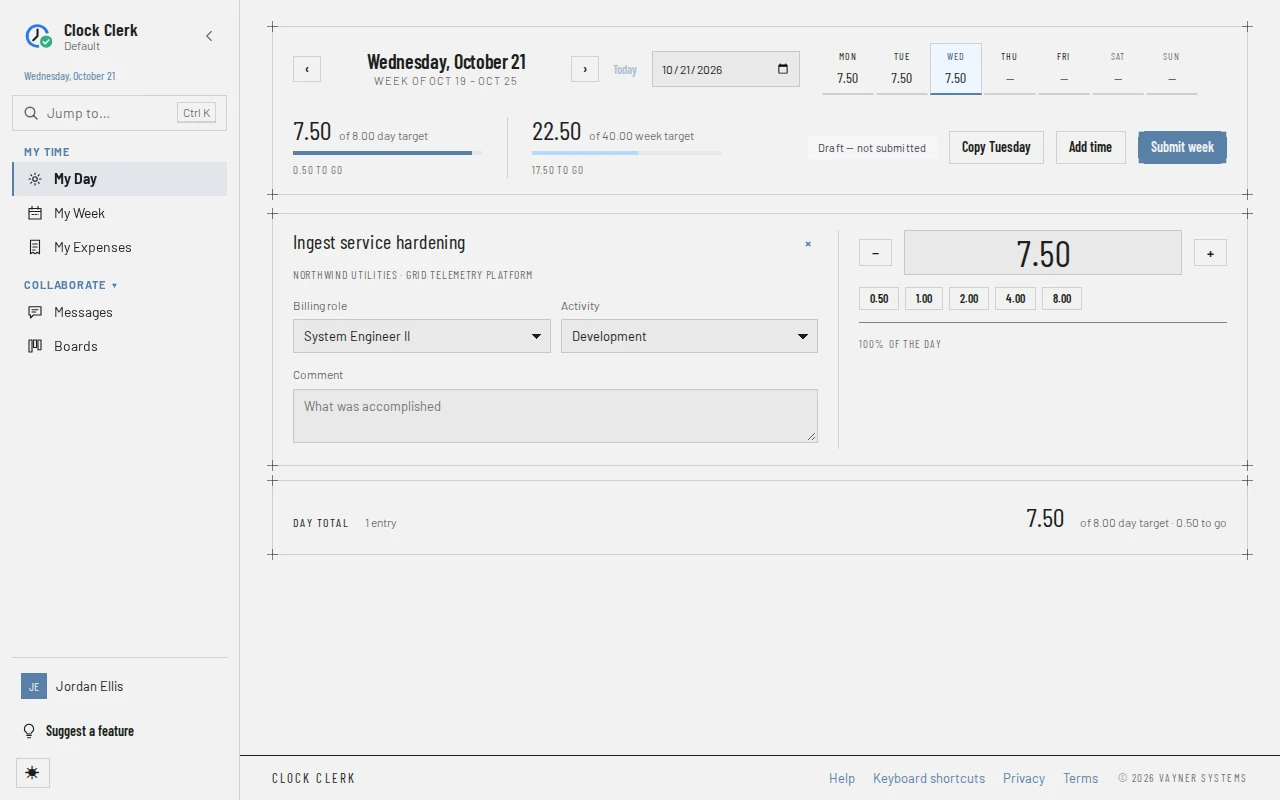
The same timesheet as My Week, one day at a time. Each task you worked on that day is a card with its hours and comment side by side, which suits filling in the day as you go. Hours entered here show on the week, and the other way round.
Who sees it
Everyone who signs in to the organization, whatever their role. It is My Day in the menu, and opens on today. Each day has its own address, ending in its date (/day/2026-10-21).
The top bar
- The day's date and the week it belongs to, with ‹ and › for the day before and after, Today, and a date box to go to any day. A holiday shows as Holiday · … or Half-day holiday · ….
- A strip of the week's seven days with each one's hours. Choose a day to go to it.
- Two meters: the day's hours against your daily target, with how much is left to go, and the week's hours against the week's target.
- The status of the month this day is in, as one label (for example October · Draft — not submitted), and Saving… while an entry is being written.
- The buttons: Copy …, Add time and Submit week.
Under the bar, a week sent back shows the reviewer's reason with a link to Open the week. A submitted day says that nothing on it can change, links to the week to reopen it, and offers Go to … for the nearest day of the week that is still open: a later one if there is one, otherwise an earlier one.
The day's tasks
- Every task on your week has a card on each open day, as it has a line on My Week, whether or not it has time on that day yet. A submitted day shows only the cards it recorded time or a comment on.
- Each card shows the task, its client and project, Done if the task is finished and Not billed to client where it is not billed. It has the line's Billing role and Activity (changing either changes the line for the whole week) and the day's Comment, which is saved with the hours: on a card with none yet it reads Saved when you enter hours until you enter some. Where the line's project doesn't ask for an activity, the card has no Activity, as on My Week: the line is booked on your organization's default activity.
- On the right of each card, the hours, with − and + for a quarter of an hour less or more, and buttons from 0.50 to 8.00 that set the hours outright. The bar under them shows the task's share of the day.
- × on a card asks Clear this day? first; choose Clear day to clear that task's hours and comment for this day. A message then offers Undo for a few seconds, which puts them back if nothing has been written on that day since. The card and the line stay on the week; to take a task off the week, remove its line on My Week.
- Day total closes the page, with the number of tasks that have time on the day and the target.
A week with no tasks on it yet says so, and offers Add time.
Buttons and when they appear
| Button | What it does | When you have it |
|---|---|---|
| Copy … (a weekday), Copy last logged day | Copies the hours and comments of the last day you logged anything before this one onto this day. The button names that day. | Disabled on a submitted day and while your organization is read-only. |
| Add time | Opens the New line dialog, as Add line does on the week. | Disabled on a submitted day and while your organization is read-only. |
| Submit week | Submits the whole week, not just the day. The dialog says how much of the week this day is. On a week that runs into a new month it reads Submit… and lists the months, as on the week. | The same as on My Week. |
| −, +, 0.50 … 8.00, × | Change or clear the hours on a card. | On an open day. A submitted day shows its cards read-only. |
There is no Reopen button on My Day: reopen the week on My Week. Moving or removing a whole line is done there too. The keys that work here are on Keyboard shortcuts.