Screens
Billing rates and team costs
Two screens hold what an hour is worth. Billing rates holds what each billing role bills a client at. Team costs holds what each person costs you. The rates price invoices, approvals and reports. The costs price reports on a cost basis. How a rate is chosen is explained in Bill a client.
Who sees them
Finance users and administrators, and nobody else: a Manager or a User has neither screen, and the app refuses both to them. They are in the menu under Receivables: Billing rates (app.clockclerk.com/finance/rates) on every plan, and Team costs (app.clockclerk.com/finance/costs) on the Team and Enterprise plans and during the trial.
While your organization is read-only, New billing role, Add rate change and Add cost change at the top are disabled, and so is everything in each role's … menu, though the menu itself still opens (see Roles). Any change is refused.
Billing rates
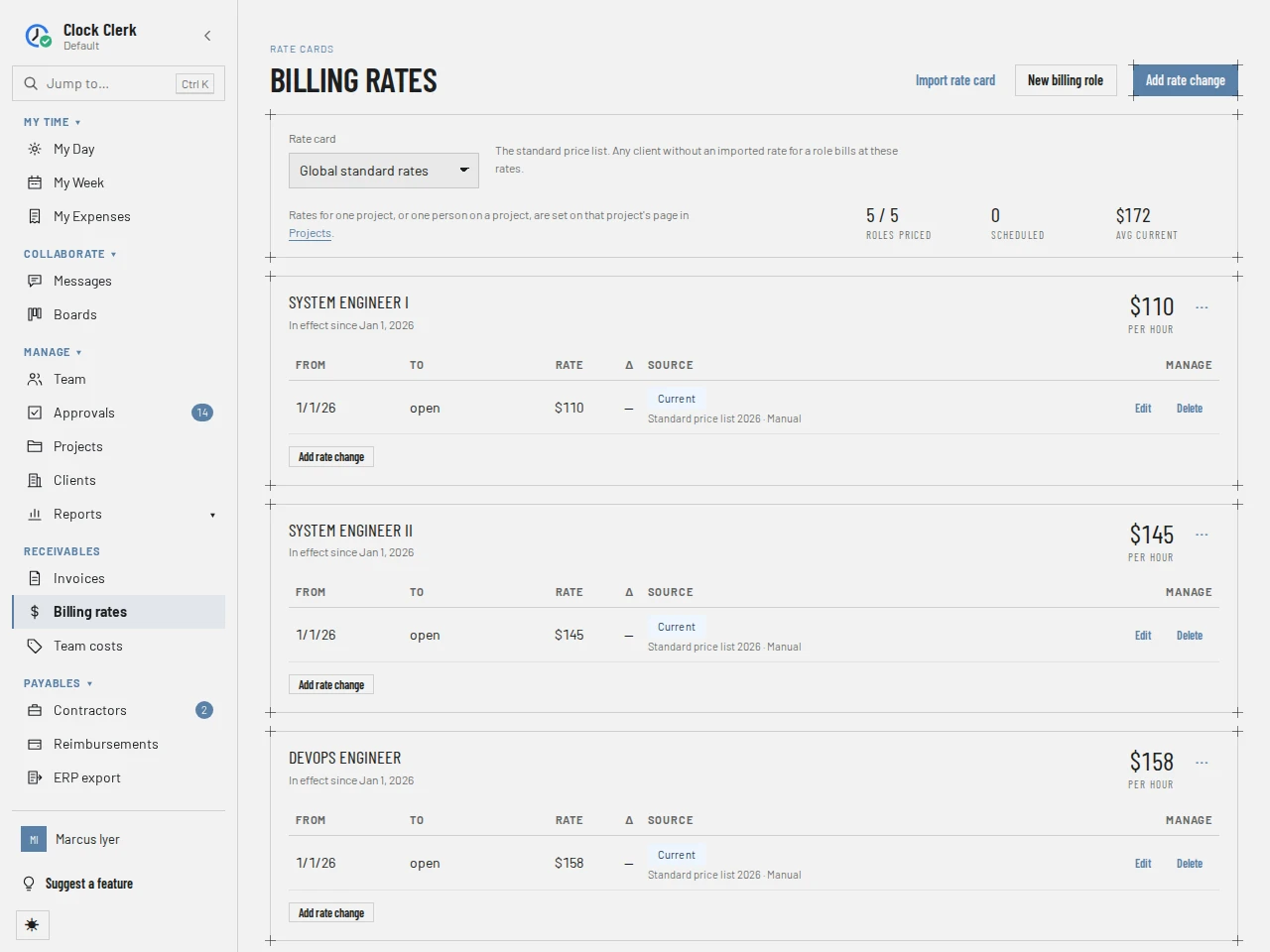
- Rate card picks which list you see: Global standard rates, the price list for every client, or one client's contract, whose rates override the standard list for the dates they cover. A client's card says Not priced — bills at global standard for a role it does not price.
- The tiles: Roles priced, Scheduled (rates that start later) and Avg current.
- A card per billing role: its rate today, per hour, and its periods: From, To (open if it has no end), Rate, the change from the period before, and Source, tagged Current, Scheduled or Expired, with the contract reference and whether it was Manual or Imported.
Add rate change opens the rate dialog: Applies to, Billing role, Rate (USD / hour), Source, Effective from, Effective to (blank = open-ended) and Contract reference. With End the rate currently in effect the day before this one starts ticked, the old rate stops where the new one begins. It is ticked for a new rate and unticked when editing one. Editing a period can change which billing role it names. It cannot move the period to another rate card (the standard list, a client's contract, a project or a person), nor switch it between a role's rate and a custom rate; for those, add one there and delete this one.
Import rate card takes a pasted list, one role, hourly rate per line (such as DevOps, 148), into the standard list or a client's contract from one date. The preview marks each line new or what it replaces, and skips lines whose role does not exist or is archived, and lines with no rate. Delete on a period asks Delete this rate period?; the hours it priced are priced again by whatever still covers them.
A client's contract rates are also shown on the client's page, under Clients.
Billing roles
New billing role adds a role with its Role name, a Standard rate (USD / hour), an Effective from date and a Contract reference, so it is priced from the start. A role names a job, such as Data Engineer, and each name is used once. A new organization starts with none: the getting-started checklist asks for the first.
The … menu on a role has Rename, Archive (or Restore) and Delete. A role nothing uses yet can be deleted with its standard price. A role already booked, assigned or priced is offered Archive role instead: it leaves every picker, keeps pricing what was booked as it, and moves under Archived roles, where it can be restored.
A project's and a person's rates
On a project's page, under Projects, Finance users and administrators also have the following. A Finance user can open every project for them, granted or not; without a grant the rest of the page is read-only.
- Billing rates: what each role bills at on this project, for everyone on it. It overrides the client's contract and the standard list.
- Rates beside a person on the Team card: what that person's hours bill at on this project, per role, overriding the project's rates. Add custom rate sets one rate for every role they book there.
Each row says which card the rate in effect comes from: Custom rate, Agreed for this person, Project rate, Client contract, Global standard, Not priced or, for a custom rate nobody has set, No custom rate. Delete there removes the period at once, without asking.
Team costs
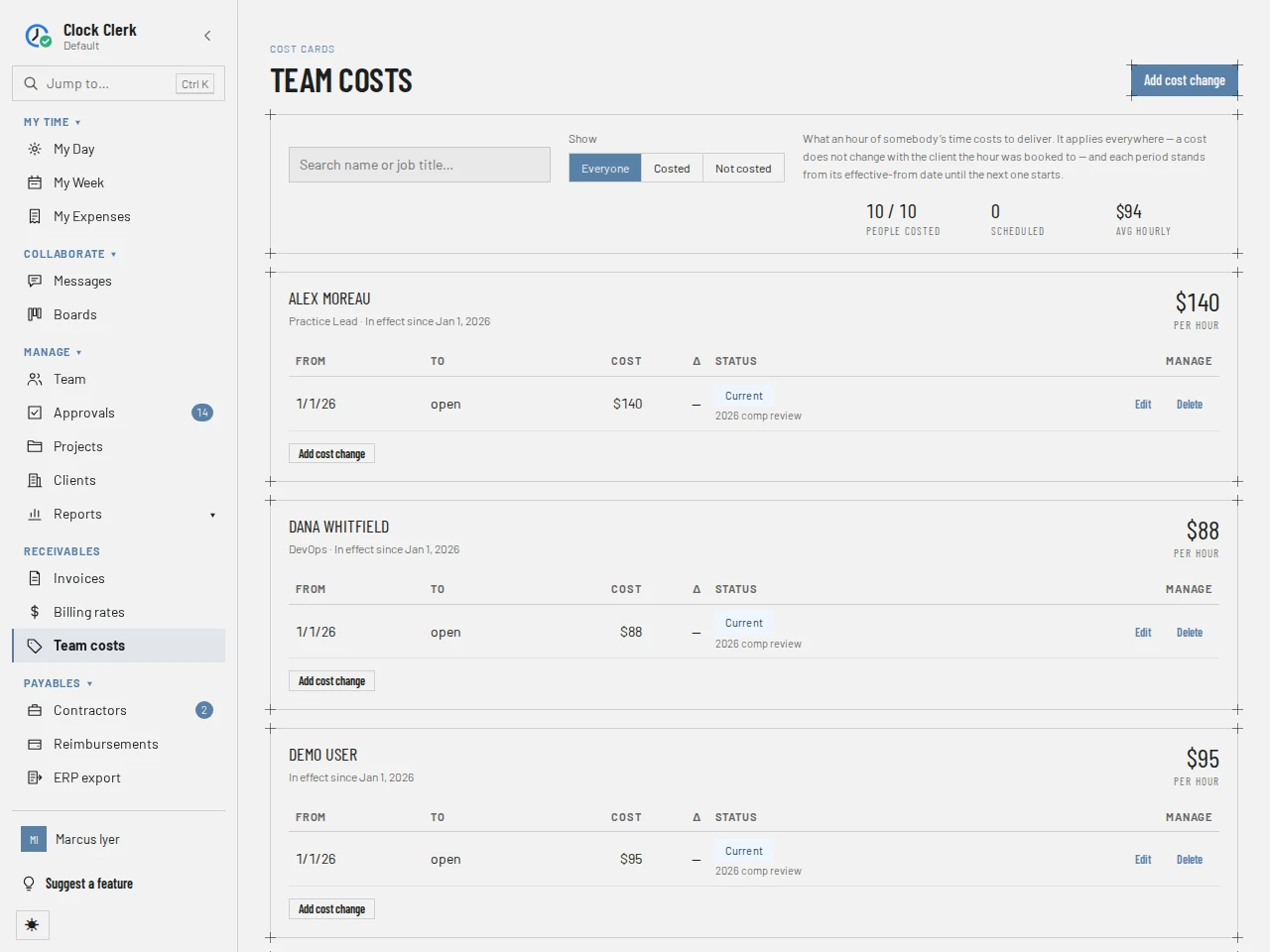
What an hour of somebody's time costs you to deliver. It is the same whichever client the hour is booked to, and like a rate, each period runs from its Effective from date until the next one starts.
- Search name or job title… and Show: Everyone, Costed or Not costed. Costed means a cost is in effect today, so a person whose cost has lapsed is Not costed.
- The tiles: People costed, Scheduled and Avg hourly.
- A card per person: their cost today, per hour, per month or per year, or, without one, No cost recorded for this person yet if they have never had a cost and No cost in effect today once theirs has lapsed, and its periods.
Add cost change asks for the Person, the Basis (Hourly, Monthly or Annual), the cost, the dates and a Note. A monthly or annual cost is turned into an hourly one month by month: the month's share is divided by the hours the person recorded in that month, so a month's costs add up to the salary. An hourly cost can be up to 100,000; for a salary, choose Monthly or Annual.
Reports never show costs to Managers or Users, and only Finance and administrators have this screen. The one exception is a contractor, whose cost here is their pay rate: they see it in the Rate column of their own protocol on My Month, and so does the manager who reviews that protocol. How a contractor's cost pays them is in Pay contractors.
Buttons
| Button | What it does | When it appears |
|---|---|---|
| Import rate card | Imports a pasted list of rates into the standard list or a client's contract. | On Billing rates. |
| New billing role | Adds a billing role with its standard rate. | On Billing rates. Disabled while read-only. |
| Add rate change | Adds a rate period. | At the top of Billing rates, disabled while read-only; on each role's card, except an archived role's. |
| Rename, Archive, Restore, Delete | Manage a billing role. | In the role's … menu. Delete is offered on an archived role only when nothing uses it. Disabled while read-only; the menu itself still opens. |
| Edit, Delete | Change or remove a rate or cost period. | On each period. |
| Rates, Add custom rate | Show and set a person's rates on a project. | On a project's Team card. |
| Add cost change | Adds a cost period. | At the top of Team costs, disabled while read-only; on each person's card. |