Screens
Projects
The project register, and each project's page: its dates, budget and billing type, the tasks people book time to, and the team, with the billing roles each person may book under. Setting up the first projects is in Set up your organization.
Who sees it
Managers, Finance users and administrators: it is Projects in the menu, under Manage, beside Clients. A User does not have it; opening its address says You don't have access to this area. A User sees the projects they are on in their own week, and their boards.
- An administrator sees and runs every project.
- A Finance user sees every project, granted or not, because they price, cost and approve the work on all of them. They run only the projects they manage, by the same rule as a Manager.
- A Manager sees and runs the projects they manage. For each project that is decided by one rule: the person's override on the project if they have one, otherwise their grant on its client, otherwise nothing. Only where that comes out as Manager do they manage the project (see Grants and project teams).
Grants are not set here. An administrator sets a person's client grants and project overrides on the person's page under Settings → People. What this page sets is the project's team: who books time to it.
Whoever runs a project can edit it, delete it, add, edit and delete its tasks, and change its team and their billing roles. Creating a project, or copying one, also takes managing its client as a whole, not just the project through an override. Its rates are for Finance users and administrators only.
A Finance user can open any project and set its rates and its people's rates, which is where Edit billing rate and Price for this project on Approvals lead. On a project they don't manage, the page is read-only apart from the rates: it has no Edit project, Copy project, Delete project, New task or Import tasks, the team and its billing roles can't be changed, and a note under the title says You can price this project's work. Changing the project itself needs access to its client — ask an administrator. The project's Board is left off too, unless they are on its team, because the board is for the people doing the work.
The register
- How many projects are active, and how many there are in all, for example 3 active · 3 total.
- Search projects or clients… narrows the list. Show completed and archived adds back the projects marked Complete and those under an archived client.
- Figures for what you reach: Active projects, Open tasks, Estimated hours (the tasks' estimates added up) and Booked value (the projects' cost estimates added up).
- A row per project, ordered by client: Project, Client, Code, Start, End, Estimate, Billing type, Status, and the number of Tasks and people on the Team. The project's name opens its page; the client's opens the client.
A project belongs to a client, so with no active client you manage there is no New project button, and an empty register says why. An administrator is offered Create a client, which opens New client on Clients; if every client is archived, it also says to restore one under Show archived there. A manager is told that an administrator can create a client or give them access. A Finance user, whose register already holds every project, is told only that there are no projects yet. Only administrators create clients.
A project's details
New project and Edit project open the same form. A new project from the register asks for its Client first, offering the active clients you manage.
- Project name, the only field you must fill in, and a Code.
- Start date and End date, and a Cost estimate (USD), the project's budget in money.
- Billing type. Time and materials is billed by the hour at the rate card in force on each day. Fixed means a fee was agreed: hours are still recorded and valued at the rate card, and reports can group and filter by it. Non-billable: nothing on the project is billed to the client, and its time counts as non-billable everywhere, whatever the activity says.
- Activities: whether time on the project names an activity as well as a task. Organization default follows your organization's setting, which the option names as currently on or currently off; Ask for an activity and Don't ask decide for this project alone, whatever the organization does. Where the project doesn't ask, its time is recorded under your organization's default activity. Anyone who can edit the project can change it.
- Status: Planning, Active, On hold or Complete. Time can be booked under any of them. Complete takes the project off the register until Show completed and archived is ticked.
- Who can see this project, with Select all: the team, as ticks. Administrators have it on a new project too; a Manager adds a new project's team on its page afterwards.
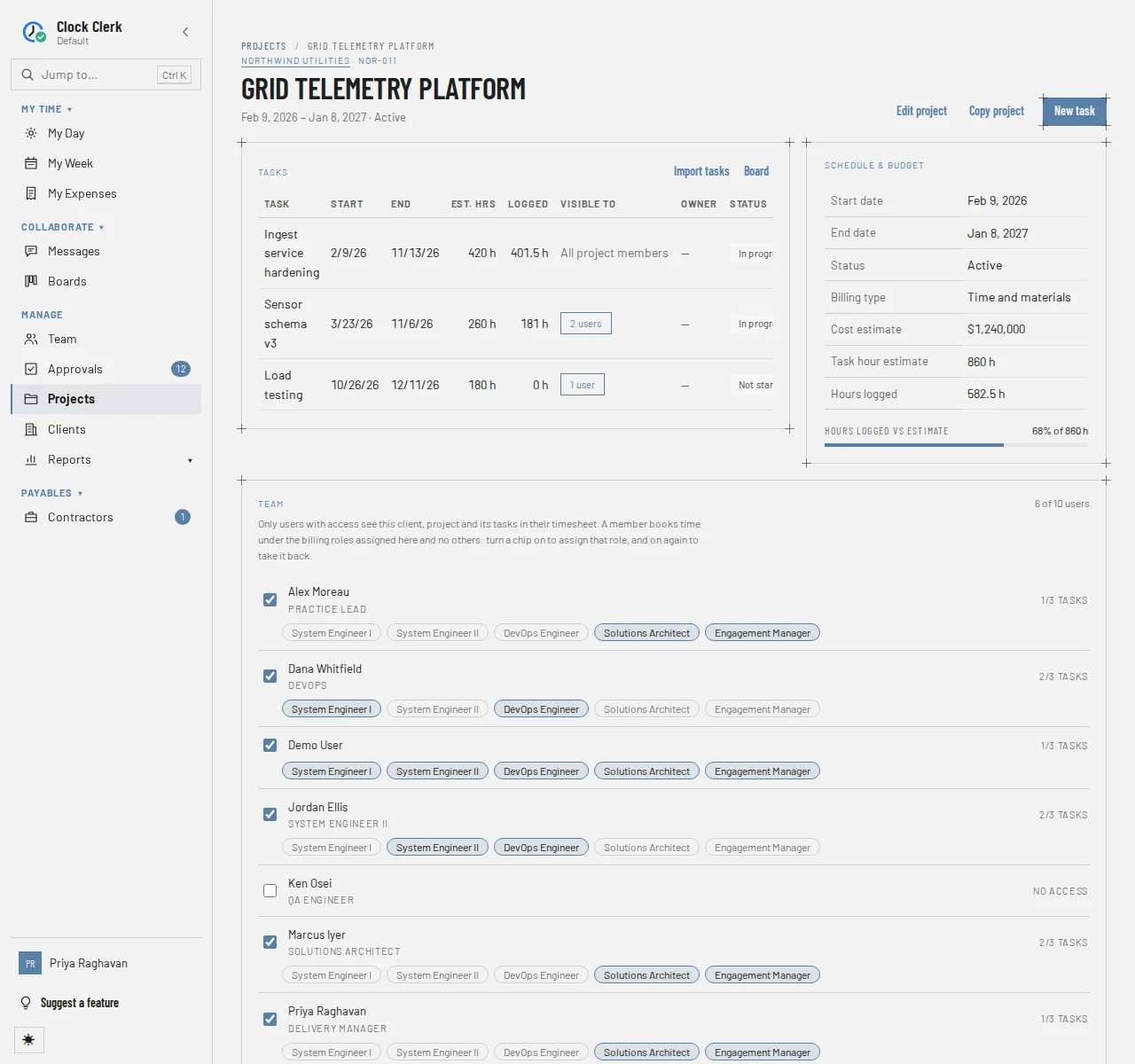
The page shows the same facts under Schedule & budget, with the Task hour estimate (the tasks' estimated hours added up), the Hours logged and a bar of Hours logged vs estimate between the two. A new project's board starts with its default columns.
On the Free plan an organization holds up to 10 projects that are not Complete. Creating, copying or reopening one past that is refused with The Free plan holds up to 10 active projects, and your organization has 10. Mark one Complete to make room, or move to the Team plan.
Tasks
Tasks are what people pick from on their week. The Tasks table lists each one's Start, End, Est. hrs, the hours Logged, who it is Visible to, its Owner and its Status. New task and Edit open a form with:
- Task name, dates and Estimated hours (optional).
- Owner, from the project's team, or Nobody, and a Description (optional).
- Status: Not started, In progress, Blocked or Done. It is the same status as the task's card on the project's board, so changing it moves the card to the first column of that status.
- Task visibility: All project members, or Selected users from the team, who are then the only ones to see it on their week. A restricted task's owner has to be one of them.
Board opens the project's board; it is not there while an administrator has Boards turned off, when the tasks are listed, edited and imported here all the same. Where your plan includes integrations, Import tasks brings tasks in from a connected tool, such as Azure DevOps, Trello, Jira or Notion; see Plan work on a board.
The team and billing roles
The Team section lists the people on the team, ticked, with how many of the organization have access in its heading, for example 6 of 10 users. They see the client, the project and its tasks on their week, with how many of its tasks they see (3/3 tasks). Everyone else is under Add people, below the team, which is folded away unless nobody is on the team yet. Open it, type part of a name or job title in its filter to find someone, and tick them to put them on the team: they move up into the team's list. Unticking someone on the team moves them back under Add people. Ticking or unticking takes effect at once. Taking someone off also takes them off any task restricted to them and clears them as its owner; hours they already booked stay.
Each person on the team has a row of chips after Books as:, one for every billing role. A person books time here only under the roles turned on for them. A chip that is on is filled and ticked; one that is off has a dashed outline and a +. Press a chip to switch it: pointing at it says what a press does, such as Assign Consultant or Withdraw Consultant. Lines already booked under a role keep it.
Someone you add to the team starts with one role already on: their own default role, or your organization's only billing role if it has just one. Otherwise their row has an amber edge and asks Choose a role so name can book time here, with the chips right after it, and the card's heading counts everyone like them, such as · 1 can't book time beside 6 of 10 users. If your organization has no billing roles yet, the rows have no chips and the card says once, under its note, Your organization has no billing roles yet, so nobody can book time here. Finance users and administrators also get Create one in Billing rates, which opens Billing rates.
Finance users and administrators also have Rates beside a person, for what that person's hours bill at on this project, and a Billing rates section for the project's own rates. Rates are covered in Billing rates and team costs.
Copying a project
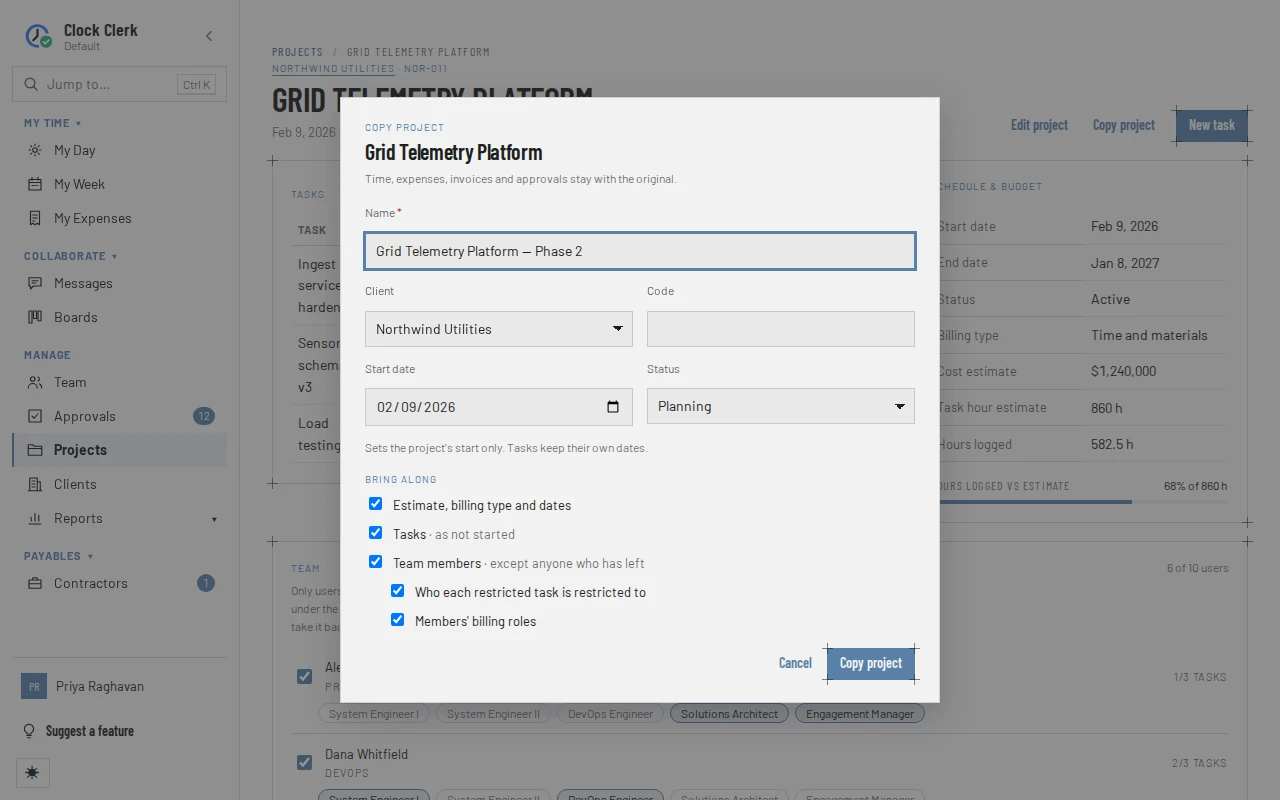
Copy project starts a new project from this one, under any active client you manage. Name the copy, and pick its Client, Code, Start date (the project's start only; tasks keep their own dates) and Status. Under Bring along, untick what you do not want: the estimate, billing type and dates; the tasks, as not started; the team members, except anyone who has left; who each restricted task is restricted to; and the members' billing roles. Finance users and administrators can also bring the project and per-person rates still open on the start date.
Hours, expenses, invoices and approvals stay with the original, and so do people's project overrides. The copy opens when it is made, with a note of anyone left off the team and any task now restricted to nobody.
Buttons and when they appear
| Button | What it does | When you have it |
|---|---|---|
| New project | Opens New project. From the register, the project opens once it is made; from a client's page, it appears in that client's Projects table. | On the register, when there is an active client you manage as a whole. Also on a client's page. Disabled while your organization is read-only. |
| Edit project | Opens the project's details. Saving replaces the team with the ticks in the form. | On every project you manage. |
| Delete project | Asks first, then deletes the project and goes back to the register. Refused for a project with history. See Deleting a project. | On every project you manage. Disabled while your organization is read-only. |
| Copy project | Opens Copy project. | When you manage the project's client as a whole. Disabled while your organization is read-only. |
| New task | Opens New task in the project. | On every project you manage. Disabled while your organization is read-only. |
| Edit, Delete (on a task) | Edit the task, or delete it at once, without asking. A task with time logged against it is not deleted: This task has time logged against it and cannot be deleted. Its comments move to the project's thread. | On every task of a project you manage. |
| Board | Opens the project's board. | On a project you manage or are on the team of. |
| Import tasks | Links the project to a task source, then picks tasks to bring in. | On a project you manage, on the Team plan and up, and during the trial. Not on the live demo. |
| Team tick, Add people, billing role chips | Put a person on the team from Add people or take them off; assign or take back a billing role. | On every project you manage. A billing role that has been archived cannot be newly assigned. |
| Rates, Add custom rate, Add rate change | Show and change what a person's hours, or every role, bill at on this project. | Finance users and administrators. |
While your organization is read-only, the forms still open but their save button is disabled, and the app refuses any other change.
Deleting a project
A project added by mistake, or never used, can be deleted with Delete project on its page, or with Delete on its row on its client's page. Either way it asks first: Delete Grid Telemetry Platform?, and says This can't be undone. Its tasks, rates and discussion threads go with it. Cancel, Escape or a click outside the box leaves everything as it was. Once it is deleted from its own page, the app goes back to the register and says Grid Telemetry Platform deleted.
A project with anything on the record against it is refused, and stays as it was. The message says what: time logged against one of its tasks (This project has time logged against one of its tasks. Mark it Complete instead, so its history stays on the record., or the same with the hours in all), hours on an invoice, a contractor's protocol or a claimed expense. Mark it Complete instead with Edit project (see the messages).