Screens
Reimbursements
Finance's run for paying employees back: a month at a time, what each person is owed for their approved claims, exported as one file and marked paid back. The steps around it are in Expenses and reimbursements.
Who sees it
Finance users and administrators: it is Reimbursements under Payables in the menu, at /expenses/reimbursements, and a Reimbursements button on My Expenses opens it on the same month. Anyone else who opens the address is told You don't have access to this area. It is on every plan.
It covers employees. Contractors are paid back on their month's protocol instead, as the page says under its heading: Approved claims to pay back to employees. Contractors are paid back on their protocol.
It stays in the menu even while an administrator has Expenses turned off for the organization. Nobody can add a claim then, but the claims submitted before are still approved and still owed, and this is where they are paid back.
Who is owed what
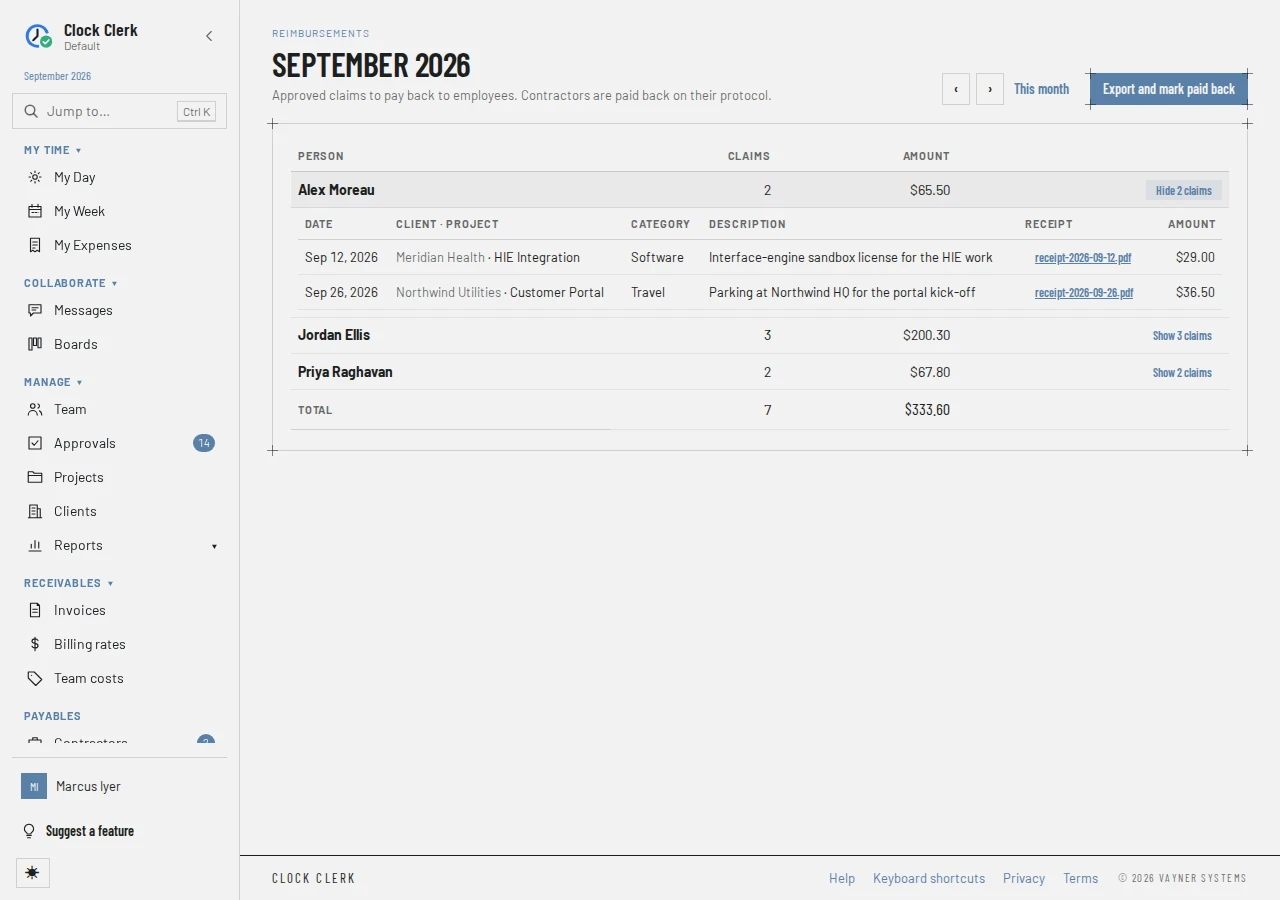
‹ and › go to the month before and after, and This month comes back. The month's claims are listed when each one:
- was ticked Paid out of my own pocket by its claimant;
- is not declined, and has not been paid back already;
- is in a week that has been approved;
- belongs to somebody without a contractor profile.
Each Person owed something has a row, with their email, how many Claims and the Amount. Show … claims opens their claims beneath, with the date, client and project, category, description, receipt and amount; choosing a receipt's name downloads it. Hide … claims closes them. The foot gives the Total.
Claims in weeks not yet approved are counted above the list, such as 1 expense ($19.20) is waiting for their week’s approval., so they can be chased. A month with nobody owed says Nobody is owed anything for …
Exporting the run
- Choose Export and mark paid back. Export and mark paid back? says how many claims, for how much, go into the file, and that each is marked paid back and its claimant can no longer change it.
- Choose Export and mark paid back. A CSV file downloads, with one row per person: payee, email, amount, number of claims, month and batch.
Every claim in the file is marked paid back in a batch named RMB- and the date and time, and the people in it leave the list. On My Expenses each claim then says Paid back and the batch. That is final. Clock Clerk does not pay anybody: pay them from the file through your payroll or bank.
Below the list
- Paid back through the ERP, where your organization's ERP export sends expenses: the month's claims that went to the ERP instead, each marked as sent to it. They are in no run and in none of the totals.
- Earlier exports: the month's past runs, each with its Batch, when it was Exported, its Claims and Amount, and Download to get the same file again. Downloading again marks nothing.
Buttons and when they appear
| Button | What it does | When you have it |
|---|---|---|
| ‹, ›, This month | Move between months. | Always; This month away from the current month. |
| Export and mark paid back | Asks to confirm, then downloads the run's file and marks every claim in it paid back. | Unless your organization is read-only. Disabled when nobody is owed anything for the month. |
| Show … claims, Hide … claims | Opens or closes a person's claims. | On each person's row. |
| A receipt's file name | Downloads the receipt. | On an open claim that has one. |
| Download | Downloads an earlier run's file again. | Under Earlier exports, once the month has had a run. |
Each export is checked again when you press it: only Finance users and administrators can run one (see Roles). Two presses at once cannot pay a claim twice.